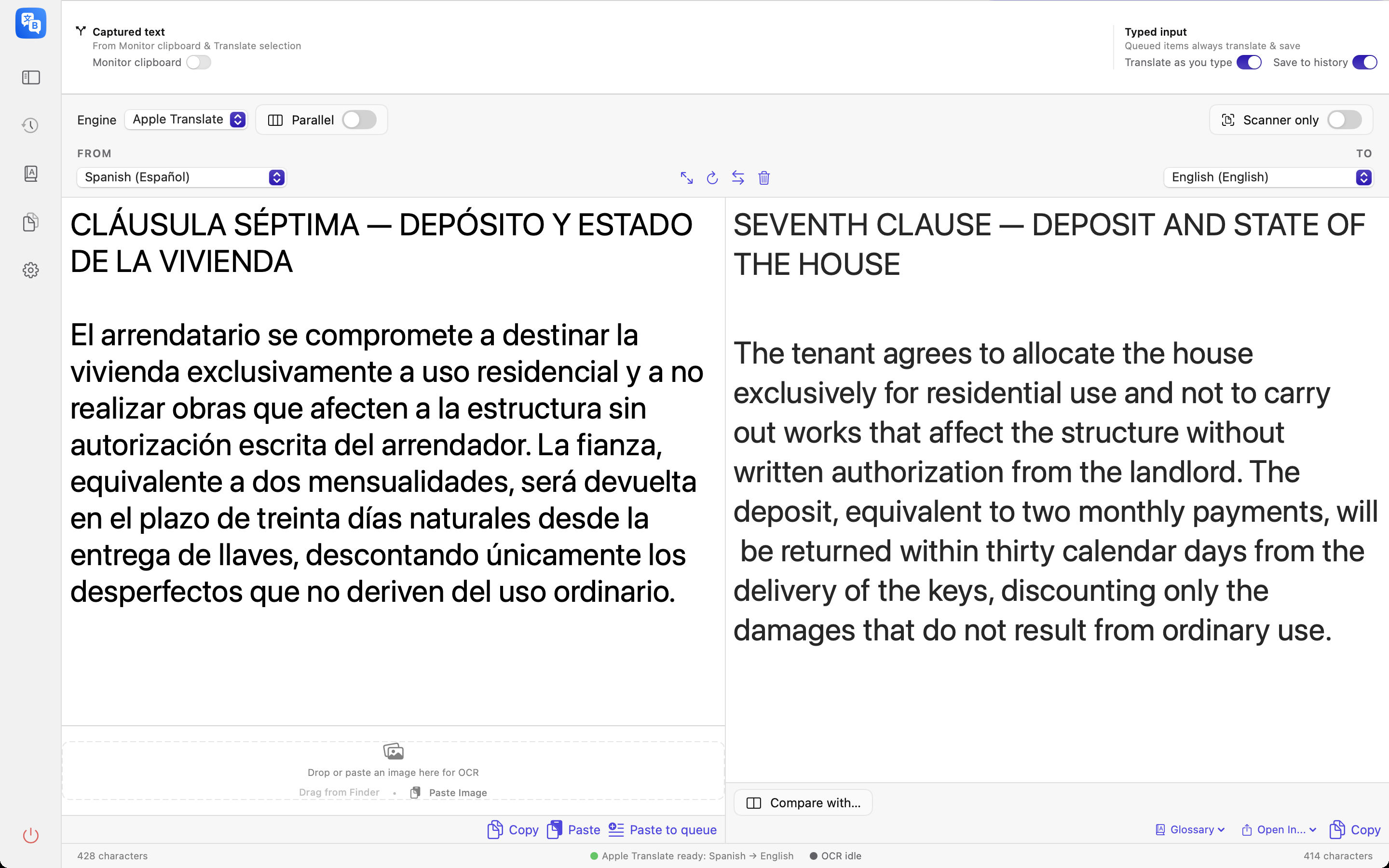
Built for real work
Documents in, documents out
Translate DOCX, PPTX and DRM-free EPUB copies with best-effort preservation of their structure. PDF, RTF and ODT are read as text; PDF layout is not recreated. TXT and Markdown are also supported. Review the exported result.
Purpose-built translation AI
Apple Translate runs on your Mac after the required language packs are installed. Download TranslateGemma 4B/12B or a Gemma 4 MLX model for local AI translation. The language picker contains 49 languages; available pairs depend on the engine. The interface is available in English and Polish.
Instant, everywhere
Menu bar access, ⌘⇧T to show the window, and ⌘⇧Y to translate selected text with Accessibility permission. Shortcuts are configurable. Clipboard monitoring can translate copied text.
One source, six languages
Parallel mode translates a single text into up to six languages at once. Save presets like “EU release notes: EN/DE/FR/PL”.
Compare backends honestly
Same text, two backends, differences highlighted sentence by sentence. Judge for yourself when local is enough.
Your terminology
Create or import glossary entries for each language pair. Check the result: terminology handling depends on the selected model. XLSX import is for glossary entries, not spreadsheet translation.
Scanned PDFs? Handled
Pages without a text layer go through built-in OCR automatically — even in mixed documents where only some pages are scans.
Search your history
Find previous translations in local history and export selected results as CSV, JSON or text.
Documents, with clear format limits
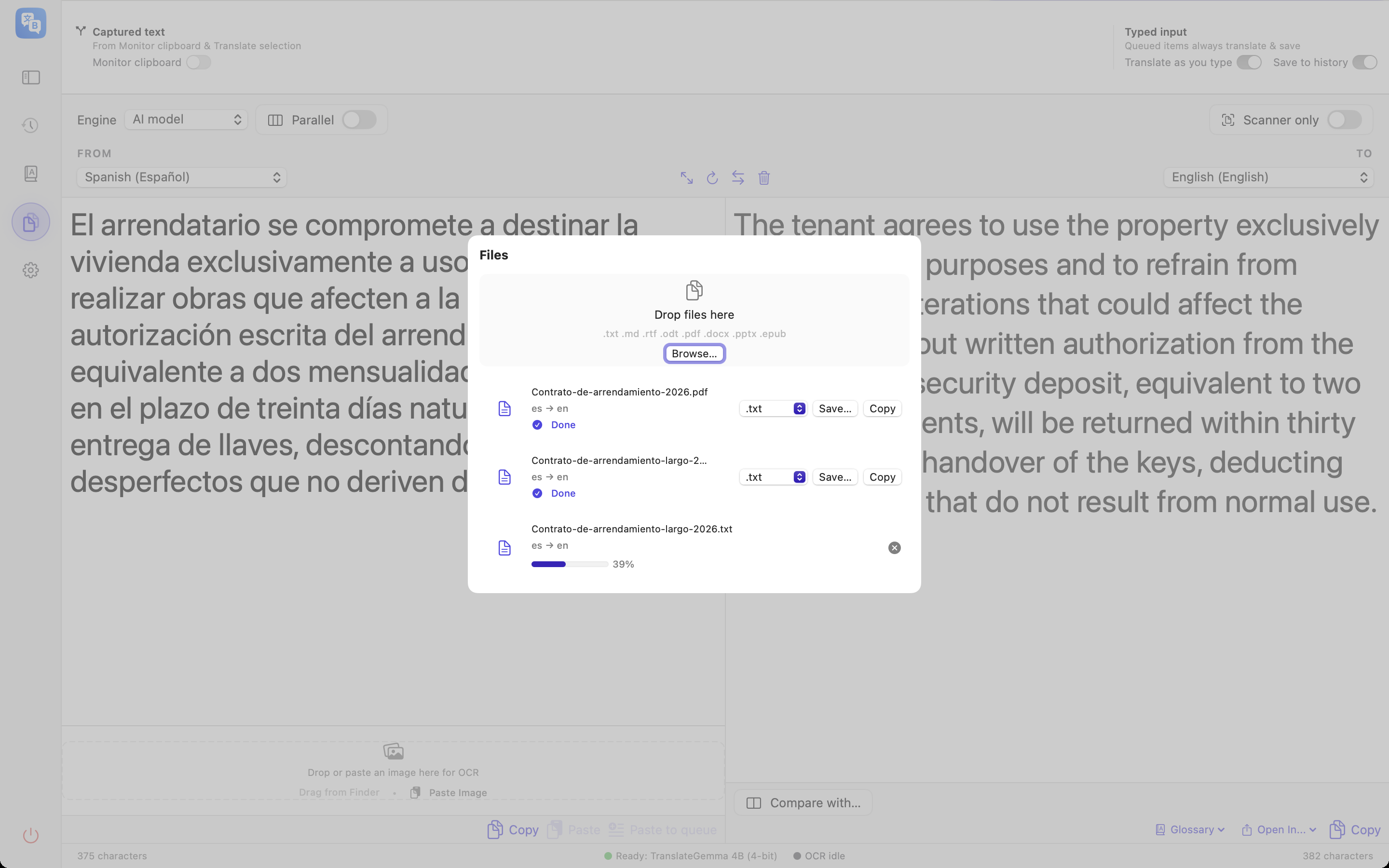
From contracts to entire books
Save a translated copy and review it next to the original. DOCX, PPTX and EPUB retain their package structure where supported; text length and unsupported elements can affect layout. PDF output is translated text, not a recreated PDF.
- Word & PowerPoint with best-effort formatting
- EPUB e-books, chapter by chapter (DRM-free files)
- Scanned PDFs via automatic per-page OCR
- TXT and Markdown; XLSX glossary import does not translate spreadsheets
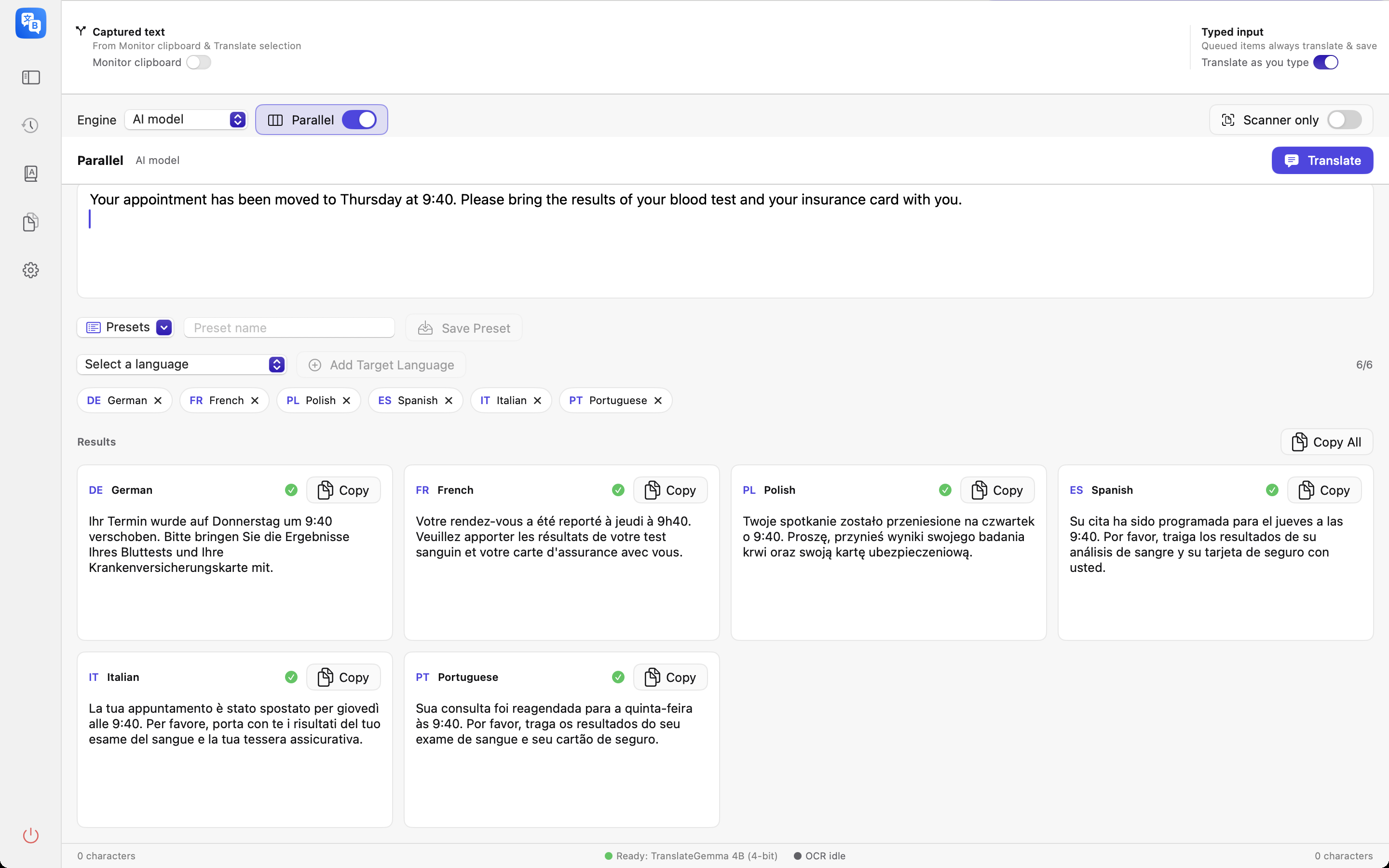
Ship in every language at once
Release notes, product copy, support replies — write once, translate into up to six languages in a single pass. Copy results one by one or all together, ready to paste.
Use glossary entries for each language pair and review terminology in every result; model support varies.
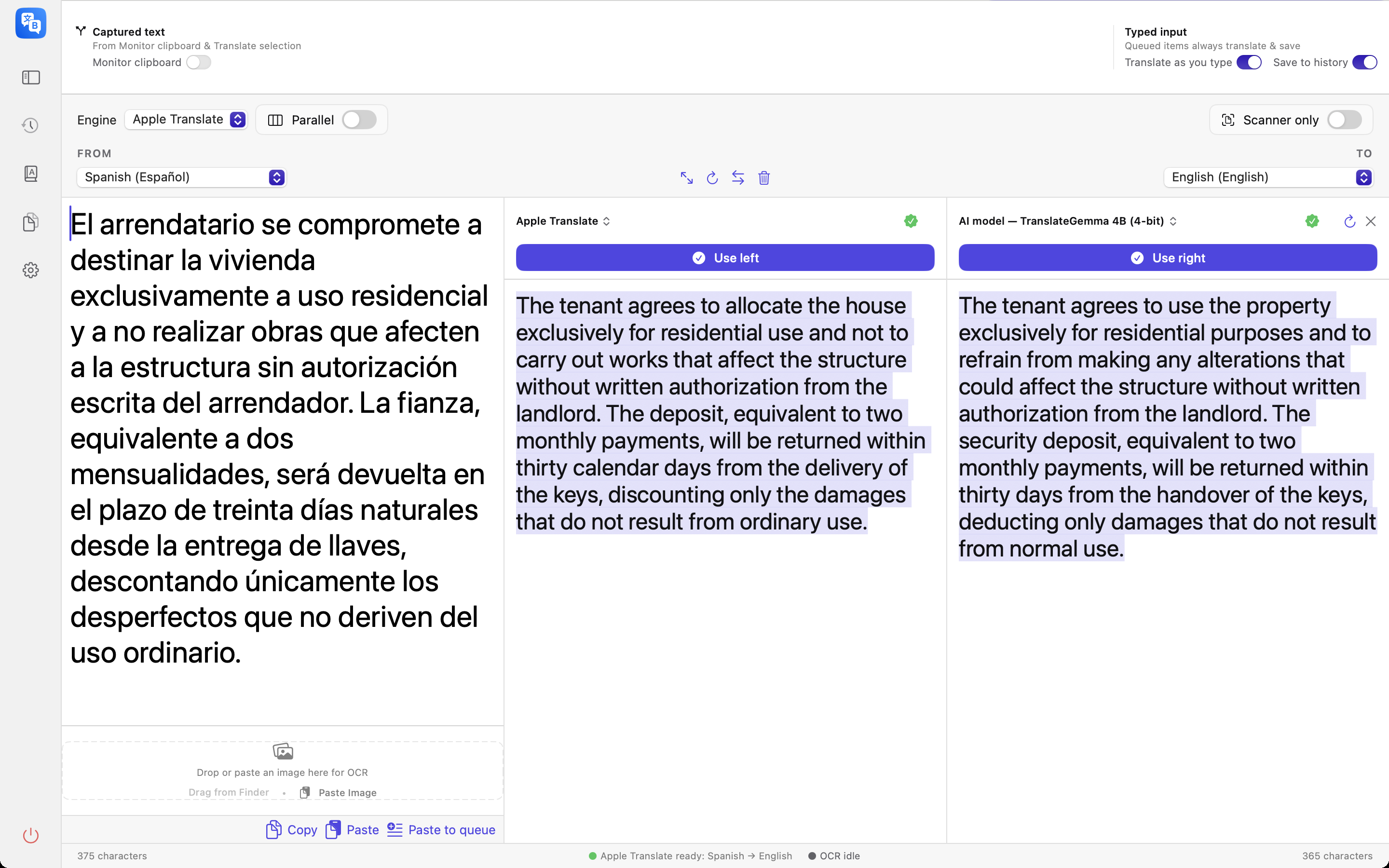
Trust, but verify
Compare mode translates the same source with two different backends and highlights where they disagree. Pick the winner with one click — only that result lands in your history.
It’s the honest answer to “is a local model good enough?” — see for yourself, on your own text.
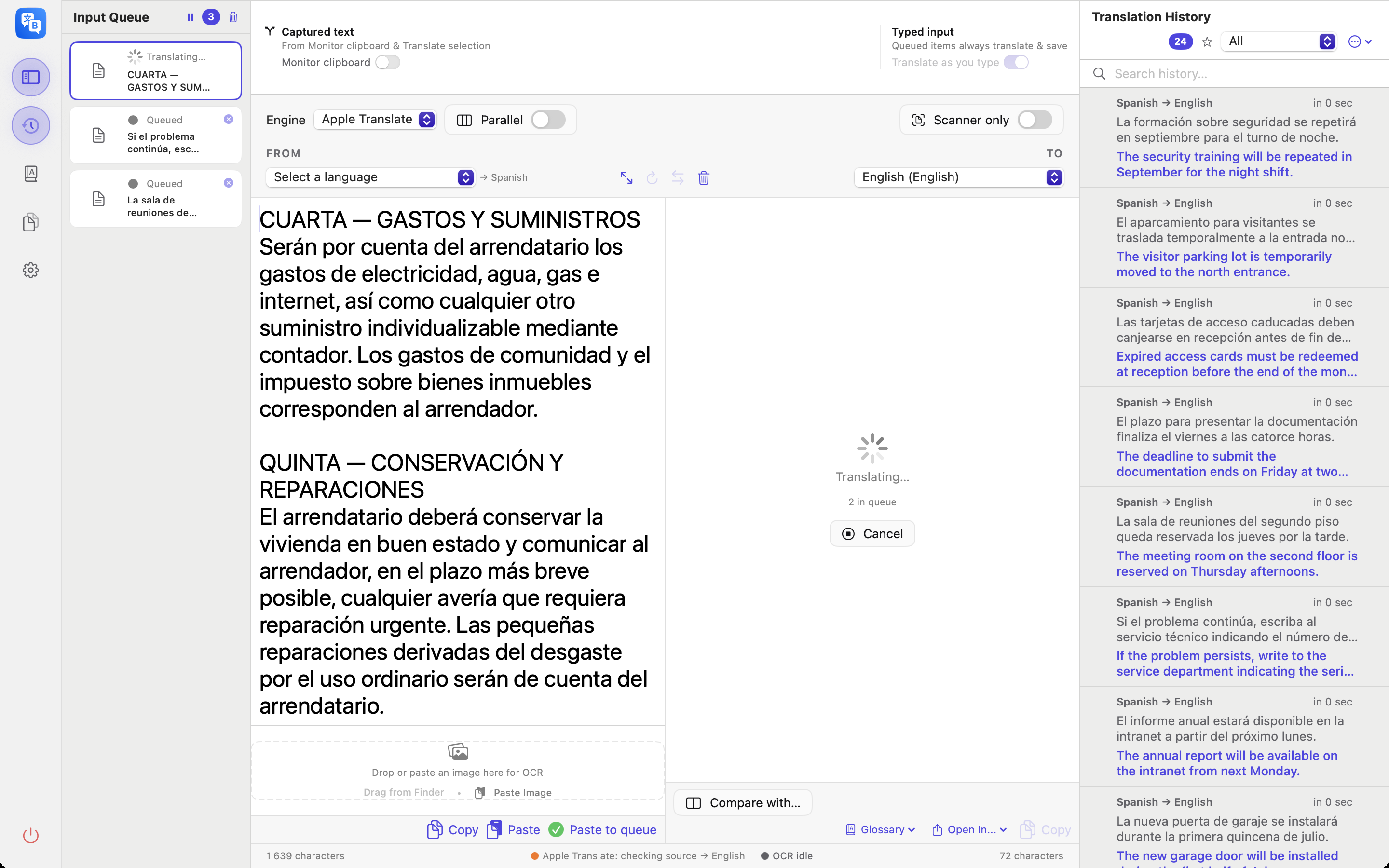
Line the work up, then walk away
Paste text, drop an image, or use Paste to queue. The queue processes items in order. Import images or supported documents from files and folders, review natural order and optional subfolders, then start. Normal projects restore saved work paused after restart; resume explicitly. A folder import is a snapshot, not a watched folder.
Pause it when you need the machine back, resume when you’re ready, drop a single item you’ve changed your mind about, or clear the lot.
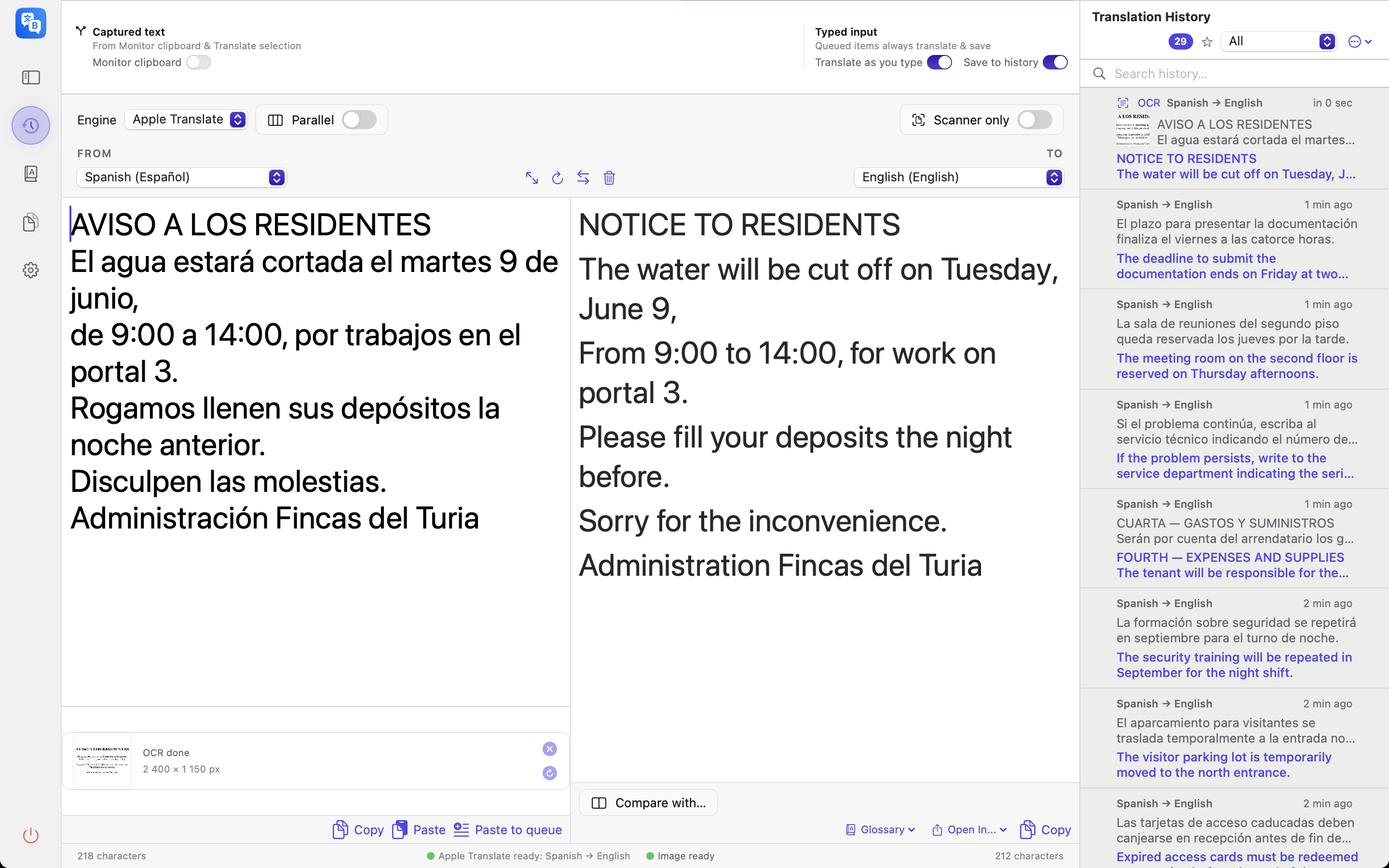
Text trapped inside a picture
Drop or paste a screenshot, a photo of a sign, or a scanned page. The text is read on your Mac — by Apple’s Vision framework, or by a downloadable AI OCR model when you want a second pair of eyes — and translated in the same pass.
Only after the text itself? Turn on Scanner only: the translation panel steps aside and leaves you a clean transcription to copy.
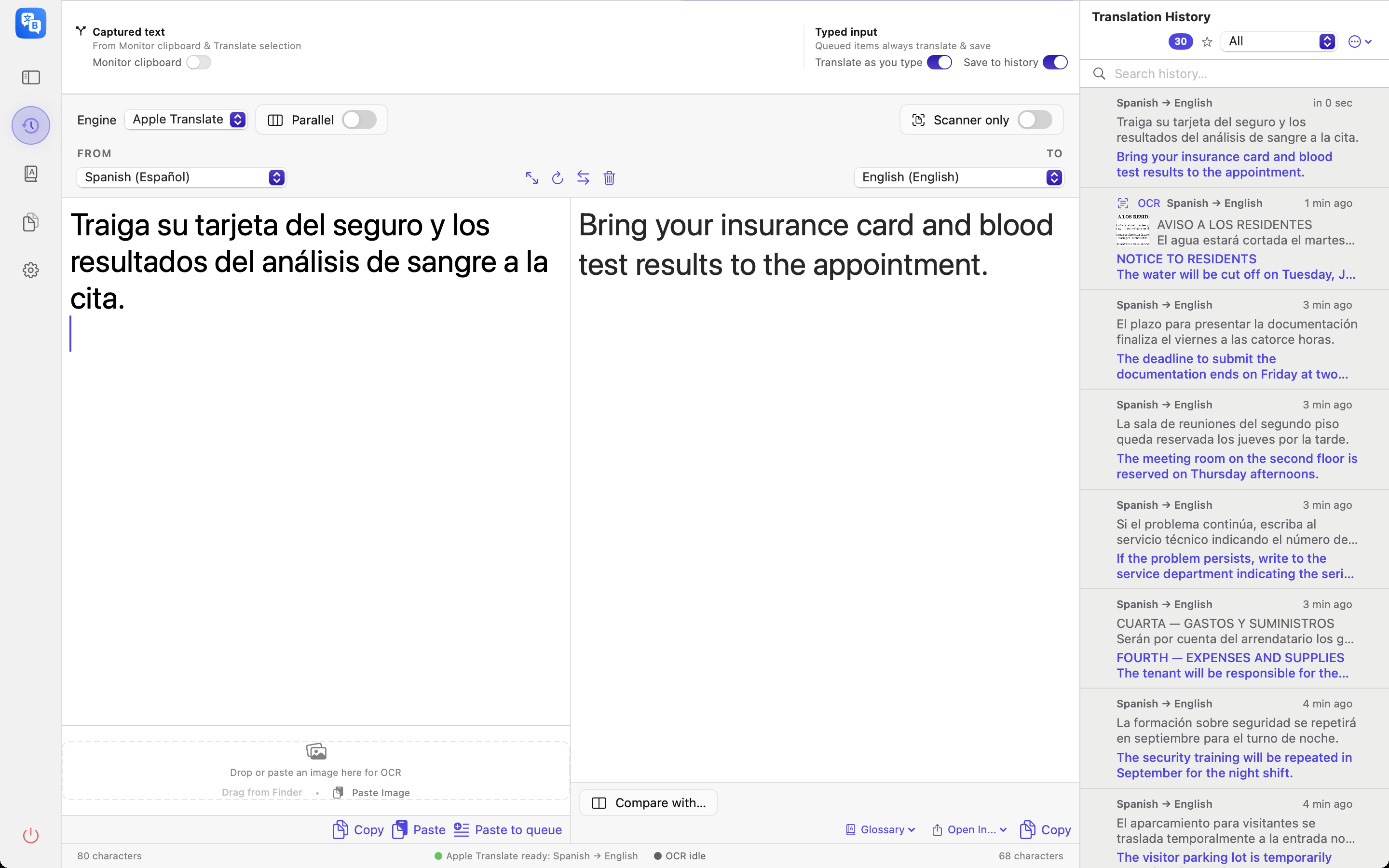
Everything you have translated, still to hand
Texts, documents, OCR reads and parallel runs all land in one local history, each with its language pair and how long it took. Search it, narrow it to a single pair, keep only the starred entries in view, or turn the order oldest-first.
Load an entry into the editor, export CSV, JSON or text, or delete it. History and glossaries are encrypted on disk with AES-GCM and the same Keychain-held key. Legacy glossary files are migrated after verification; failed migration keeps the original and shows an error. Exports, clipboard copies and older backups are outside that encryption.
How far do your words travel? You decide.
Choose the place of processing: on-device, a server on this Mac, a computer on your LAN, or an API provider.
On your Mac
The default. Nothing to configure.
- Apple Translate with installed language packs, or a downloaded MLX model
- Works with the network cable unplugged
- Offline mode prevents starting model downloads and cloud/LAN translation; loopback servers remain available
- History stays in a local database you control
On your network
Optional — for bigger models on your own hardware.
- Point the app at Ollama or LM Studio on any machine you control — including this Mac
- A server on this Mac processes text on this Mac; a server on another LAN computer receives text off this Mac
- The server software and its configuration determine logging and any onward connections
Your API key
Optional — select a provider and supply your API key.
- Connect your own key: OpenAI, Anthropic, Mistral, Google, OpenRouter
- Your text is sent to that provider, on your account and at your cost
- Every cloud backend is labeled CLOUD and blocked in offline mode
- Keys live only in your macOS Keychain — we never see them
Bilargo operates no inference server and receives no translation requests. Offline mode prevents starting app-managed model downloads and cloud/LAN translation, while allowing loopback servers on this Mac. It does not guarantee cancellation of requests already running or control Apple-managed language packs, purchases, restoration, updates or other apps.
(04) PricingFree every day, optional Pro
Free: 10 completed materials per local day. Optional seven-day Pro trial; after it ends, Free remains. Documents and Parallel need Pro or trial.
PLN 19.99 launch · PLN 39.99 regular
- One-time Lifetime unlock; no app subscription
- Text, OCR, queue, Compare, glossary and engine choice in Free; API usage billed separately
- Approved Poland offer: PLN 19.99 for the first 30 days from launch, then PLN 39.99. Launch date and other regional prices are not set; the verified store offer will govern
Questions, answered
Does it really work offline?
Yes, with the required Apple language packs or MLX model installed. Offline mode prevents starting app-managed model downloads and cloud/LAN translation; loopback servers on this Mac remain available. It does not guarantee cancellation of requests already running or block system-managed Apple traffic and other apps.
When exactly does my text leave my Mac?
Text stays on this Mac with on-device engines or a server hosted on this Mac. Selecting another computer on your LAN sends text off your Mac. Selecting an API provider sends text to that provider. Each server can have its own logging and network behavior.
Which languages and models does it use?
The interface has English and Polish versions. The translation picker lists 49 languages. Apple Translate supports the pairs reported by macOS and may need language-pack downloads. TranslateGemma and Gemma 4 MLX run after their model download. API and server language support depends on the model you select; OCR depends on installed recognition resources.
What do I need to run it?
An Apple Silicon Mac on macOS 15+, with 8 GB RAM minimum. Larger models require more memory; choose a model that fits your Mac.
Can it translate DRM-protected e-books?
No. Only DRM-free EPUB files are supported. Protected books are detected and declined with a clear message.
What does “bring your own key” cost?
Nothing extra from us. If you connect a cloud provider, you pay that provider directly under your own account. The app never marks up or brokers API usage.
Is my translation history private?
It’s stored only on your Mac. Full-text search, filtering, and CSV/JSON export are all local. Delete it anytime.
Can I translate a PDF without uploading it anywhere?
Yes: select an on-device translation engine with its resources installed. OCR reads scanned pages locally. The output is translated text; the original PDF layout is not reconstructed. With a LAN or API engine the extracted text is sent to that selected destination.
What file formats can I translate?
DOCX, PPTX and DRM-free EPUB with best-effort structure preservation; PDF, RTF and ODT as text; TXT and Markdown. Scanned PDF pages use local OCR. PDF layout is not recreated. XLSX is for glossary import, not spreadsheet translation.
Is this a private alternative to online translation sites?
On-device engines translate on your Mac with installed resources. A server on this Mac also processes locally; another LAN computer or API provider receives your text off this Mac. Choose the destination for each task.
Do I need a subscription?
Free includes 10 completed materials per local day. Optional seven-day Pro trial and one-time Pro/Lifetime; after trial Free remains. Documents and Parallel need Pro. API usage costs extra. Poland: PLN 19.99 for 30 days from launch, then PLN 39.99; launch date is not set.
Your words. Your Mac. Your business.
Use Free daily; try Pro for 7 days when you choose.